
 ·
6 minute read
·
6 minute read
When we use Kubernetes, we don't need to know the IP address of every Service. We can just use the Service name:
curl http://backend:8080Here we only use backend. We don't use the Service IP anywhere in the request. But Kubernetes still needs to find where backend is before sending the request.
We can see this more clearly when there is a DNS problem. Maybe the Service IP works:
curl http://10.96.120.15:8080but this one fails:
curl http://backend:8080The Service exists and network connectivity is working, but the application still cannot reach backend by its name. At this point, the problem may be DNS.
So what actually happens between curl http://backend:8080 and 10.96.120.15? This is where CoreDNS comes into the picture.
Let's start with a small example
Let's examine what happens when we send a request to a pod running in Kubernetes. Our frontend Pod can reach the backend by using the Service name.
apiVersion: apps/v1
kind: Deployment
metadata:
  name: backend
spec:
  replicas: 2
  selector:
    matchLabels:
      app: backend
  template:
    metadata:
      labels:
        app: backend
    spec:
      containers:
      - name: backend
        image: hashicorp/http-echo:1.0
        args:
        - "-text=Hello from backend"
        - "-listen=:8080"
        ports:
        - containerPort: 8080
---
apiVersion: v1
kind: Service
metadata:
  name: backend
spec:
  selector:
    app: backend
  ports:
  - port: 8080
    targetPort: 8080
---
apiVersion: v1
kind: Pod
metadata:
  name: frontend
spec:
  containers:
  - name: frontend
    image: curlimages/curl:latest
    command:
    - sleep
    - "3600"
# default namespace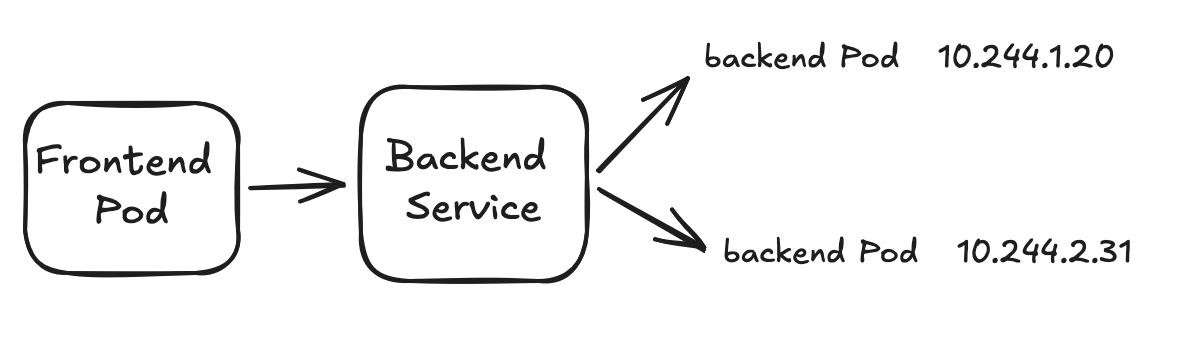
First, let's check our backend Service:
$ kubectl get svc backend

NAME      TYPE        CLUSTER-IP      PORT(S)
backend   ClusterIP   10.96.120.15    8080/TCP
When we run curl http://backend:8080 from the frontend Pod, the application does not know 10.96.120.15. It first needs to resolve the name backend.
Where does the Pod send the DNS query?
Let's check the resolver configuration inside the frontend Pod:
$ kubectl exec -it frontend -- cat /etc/resolv.conf

search default.svc.cluster.local svc.cluster.local cluster.local
nameserver 10.96.0.10
options ndots:5
There are three useful things here: search, nameserver and ndots.
Where does nameserver 10.96.0.10 come from?
$ kubectl get svc -n kube-system kube-dns

NAME       TYPE        CLUSTER-IP    PORT(S)
kube-dns   ClusterIP   10.96.0.10    53/UDP,53/TCP
The nameserver inside the Pod and the ClusterIP of the kube-dns Service are the same. So the Pod sends its DNS queries to this Service.
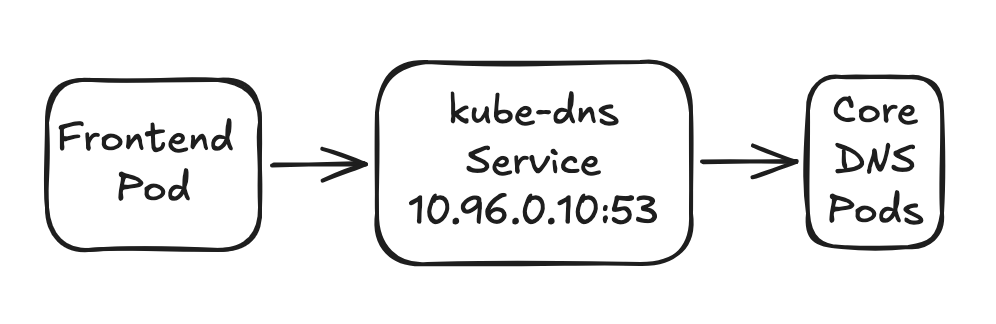
The Service can still be called kube-dns, but on modern Kubernetes clusters CoreDNS is normally running behind it.
$ kubectl get pods -n kube-system -l k8s-app=kube-dns

NAME                          READY   STATUS
coredns-668d6bf9bc-8v5jq      1/1     Running
coredns-668d6bf9bc-m8k7p      1/1     Running
How does backend become a full DNS name?
We also have a search line in /etc/resolv.conf. Our frontend is in the default namespace, so backend can be resolved like this:
backend.default.svc.cluster.localWe can read the Kubernetes Service DNS format like this:
<service>.<namespace>.svc.<cluster-domain>

backend.default.svc.cluster.local
That is why backend is usually enough when both applications are in the same namespace. For another namespace, we can use a name such as backend.production.
What does ndots:5 do?
One interesting setting in Kubernetes DNS is ndots:5. It changes how the DNS name is searched.
For example, our application wants to reach api.example.com. This name has 2 dots, while ndots is 5. Depending on the resolver and library, the search domains are tried first:
api.example.com.default.svc.cluster.local
api.example.com.svc.cluster.local
api.example.com.cluster.local
api.example.com
Depending on the resolver and library, the search domains can create extra DNS queries before the real external name is tried. On a busy cluster, this can become extra DNS traffic and latency.
The query reached CoreDNS. What happens now?
The CoreDNS configuration is normally stored in a ConfigMap in kube-system:
$ kubectl get configmap coredns -n kube-system -o yamlNow let's check what we have inside the Corefile:
.:53 {
    errors
    health
    ready

    kubernetes cluster.local in-addr.arpa ip6.arpa {
        pods insecure
        fallthrough in-addr.arpa ip6.arpa
    }

    prometheus :9153
    forward . /etc/resolv.conf
    cache 30
    loop
    reload
    loadbalance
}
CoreDNS works with plugins
CoreDNS uses different plugins for different jobs. The lines we see in the Corefile, such as kubernetes, forward, cache and prometheus, have different jobs.
The kubernetes plugin
For Kubernetes DNS, this is one of the most important plugins. CoreDNS uses it to work with Kubernetes Service and endpoint information. We created our Service, but we didn't add any DNS records for it. CoreDNS works with the Kubernetes API and follows the information in the cluster.

At this point, DNS has done its job: backend is now 10.96.120.15. How traffic from that Service IP reaches one of the backend Pods is a Kubernetes networking topic.
What if we query google.com?
google.com is not a Kubernetes Service, so CoreDNS cannot answer it from Kubernetes Service information. This is where the forward plugin is useful.
forward . /etc/resolv.conf
CoreDNS does not keep all internet DNS records. It can answer our cluster DNS names and forward other queries to an upstream resolver.
Why do we have a cache plugin?
Hundreds or thousands of Pods can ask for the same names again and again. Caching DNS responses can reduce the work for CoreDNS and the upstream DNS servers.
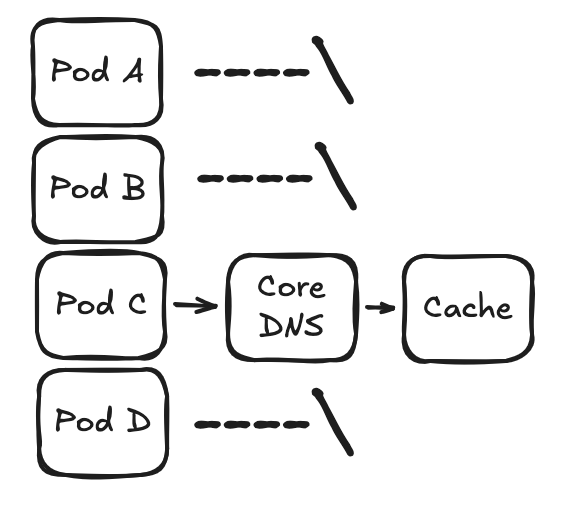
What changes with a headless Service?
A normal Service usually gives us a ClusterIP.

For a headless Service, we use clusterIP: None:
spec:
  clusterIP: None
Now DNS can return the endpoint addresses behind the Service instead of one ClusterIP.
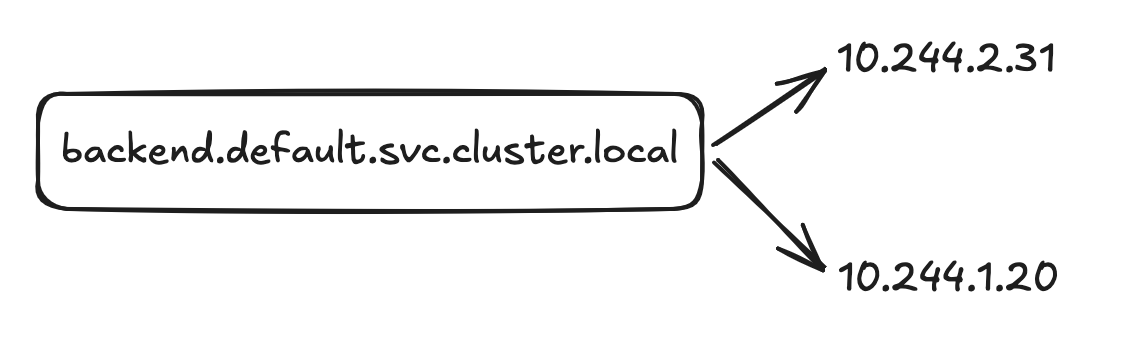
StatefulSets and DNS
Headless Services become very useful with StatefulSets. StatefulSet Pods can have stable identities, and together with a headless Service we can get stable DNS names.
mysql-0.mysql.default.svc.cluster.local
mysql-1.mysql.default.svc.cluster.local
mysql-2.mysql.default.svc.cluster.local
This is useful for systems such as database clusters where members need to find each other using stable names.
What happens if CoreDNS is down?
If CoreDNS goes down, our running containers will keep running. The problem is that new DNS queries may fail, so applications can no longer find other Services by name. The network can still work, but DNS can fail:
payment-api --> lookup timeout / no such host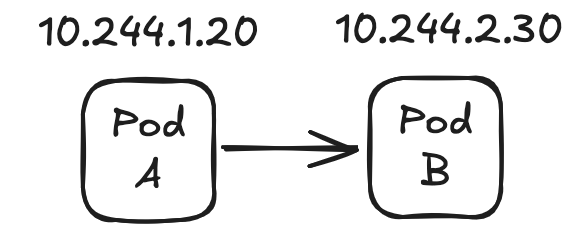
This is why a DNS problem can sometimes look like an application or network problem.
How I would troubleshoot CoreDNS
We can check the DNS flow step by step. First, check the Pod DNS configuration:

$ kubectl exec -it <pod> -- cat /etc/resolv.confThen test a basic Kubernetes DNS name:
$ kubectl exec -it <pod> -- nslookup kubernetes.defaultIf the container does not have nslookup, we can create a temporary debug Pod:
$ kubectl run dns-test --image=busybox:1.36 --restart=Never -it --rm -- sh

/ # nslookup kubernetes.default
Then we can check the DNS Service, endpoints, CoreDNS Pods and logs:
$ kubectl get svc -n kube-system kube-dns
$ kubectl get endpointslice -n kube-system -l k8s-app=kube-dns
$ kubectl get pods -n kube-system -l k8s-app=kube-dns
$ kubectl logs -n kube-system -l k8s-app=kube-dns
NXDOMAIN, SERVFAIL and timeout are different
NXDOMAIN - The DNS server is working, but it can't find the name. Maybe our Service name or namespace is wrong.
SERVFAIL - CoreDNS got the request but couldn't answer it. We should check CoreDNS and the DNS server it uses.
Timeout - The query was sent but no answer came back in time. We should check the path to the kube-dns Service, the CoreDNS Pods and the upstream DNS.
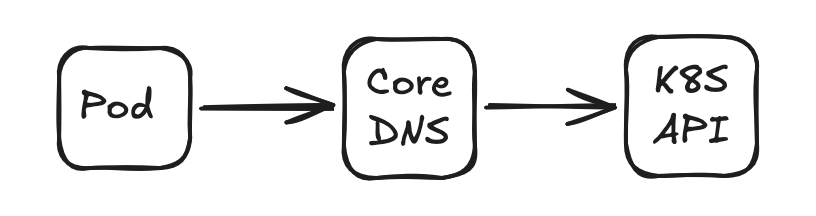
CoreDNS also talks to the Kubernetes API
CoreDNS is not only receiving DNS queries from Pods. The kubernetes plugin also needs information from the Kubernetes API. So when troubleshooting, API connectivity is another part we should remember.
CoreDNS and performance
On a small cluster, we may never think about DNS load. As the cluster grows, request rate, CPU, memory, cache behavior and upstream DNS latency become more important.
DNS lookup     150 ms
TCP connection  10 ms
HTTP request    20 ms
---------------------
Total          180 ms
In this example the application itself is fast, but DNS adds most of the delay. So sometimes an "application is slow" problem can actually include a DNS problem.
Monitoring CoreDNS with Prometheus
If the prometheus plugin is enabled, CoreDNS can expose useful metrics:
prometheus :9153

coredns_dns_requests_total
coredns_dns_responses_total
coredns_dns_request_duration_seconds
Request count, response codes and DNS latency are useful things to watch. For example, an increase in SERVFAIL responses or DNS latency can give us an early signal.
CoreDNS AutoScaling
As the cluster grows, DNS traffic can also increase. We may need more CoreDNS replicas. Instead of changing the replica count manually, we can use Cluster Proportional Autoscaler.
apiVersion: v1
kind: ConfigMap
metadata:
  name: coredns-autoscaler
  namespace: kube-system
data:
  linear: |-
    {
      "coresPerReplica": 256,
      "nodesPerReplica": 16,
      "min": 2,
      "max": 10,
      "preventSinglePointFailure": true
    }
In this example, the autoscaler looks at the number of nodes and CPU cores in the cluster. With nodesPerReplica: 16, the node calculation can look like this:
32 nodes  -->  2 replicas
48 nodes  -->  3 replicas
80 nodes  -->  5 replicas
min: 2 means CoreDNS will not go below 2 replicas. max: 10 means it will not go above 10 replicas.
This is not the same as HPA. Here we are not scaling CoreDNS because CPU usage is high. We are changing the replica count according to the cluster size. But autoscaling alone doesn't solve a DNS problem - if we have high DNS latency or too many requests, we should still check CoreDNS metrics, cache, upstream DNS and the network.
Why do we have NodeLocal DNSCache?
On larger clusters, NodeLocal DNSCache can run a local DNS cache on each node. A Pod can ask the local DNS first, and only a cache miss needs to continue to the cluster DNS.
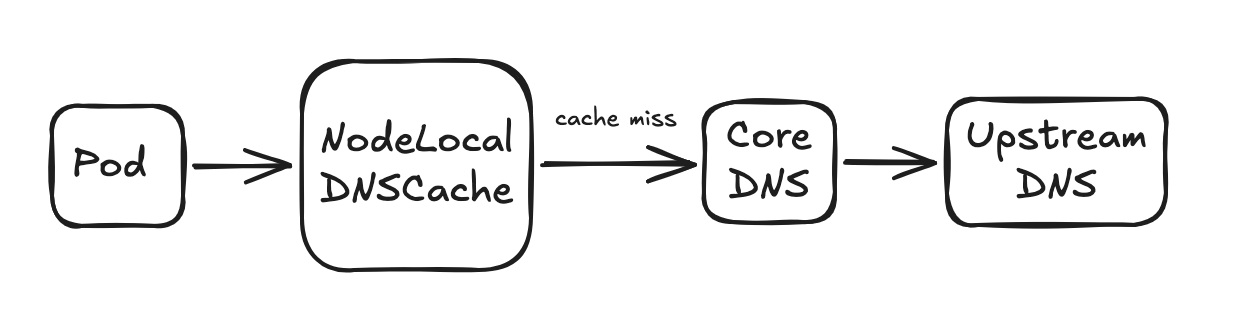
This can reduce DNS traffic and help with some DNS connection problems on larger clusters.
Let's put the whole DNS flow together

For external domains, CoreDNS uses the forward plugin.
Conclusion
Kubernetes DNS looks simple from the application side - another Pod can reach our Service by its name. But behind that simple name we have the resolver configuration, search domains, ndots, the kube-dns Service, CoreDNS plugins, the Kubernetes API and upstream DNS.
For me, the most useful part of understanding CoreDNS is troubleshooting. If we see no such host, SERVFAIL or a timeout, we can follow the query step by step instead of restarting CoreDNS and hoping it fixes the problem.
So basically, CoreDNS resolves our Kubernetes Service names. If CoreDNS can't find the domain in our cluster, it asks another DNS server.